
How to Use Google Trends to Find Content Ideas (and Stay a Step Ahead of Your Competitors)
Have you ever published a blog post you were really proud of and heard nothing at all? Most of the time the writing isn’t the problem. The topic arrived too late, or nobody was searching for it at that moment.
That’s where Google Trends comes in. It tells you what people are searching for, when interest rises and falls, and where in the world it’s happening. Used right, it takes a lot of the guesswork out of choosing what to write.
This guide shows you how to use Google Trends, even if you’ve never opened it before.
What Are Google Trends and Why Does It Matter?
Google Trends shows how popular a search term is over time. It doesn’t show you the raw search numbers, only how much interest there is compared to the maximum popularity of that term in the period and place you selected.
That sounds simple, but it tells you a lot. You can see if a topic is growing, fading or just seasonal. You can see which ideas people are comparing and which they prefer. And you can see which cities or states are searching for it, if you serve local customers.
If you’ve heard of google search trends, it’s the same thing. Think of it as a weather forecast for content. You wouldn’t plan a picnic without checking the sky, so don’t plan a content calendar without checking the trends.
How to Use Google Trends for Content Ideas
If you’re stuck on what to write next, try this.
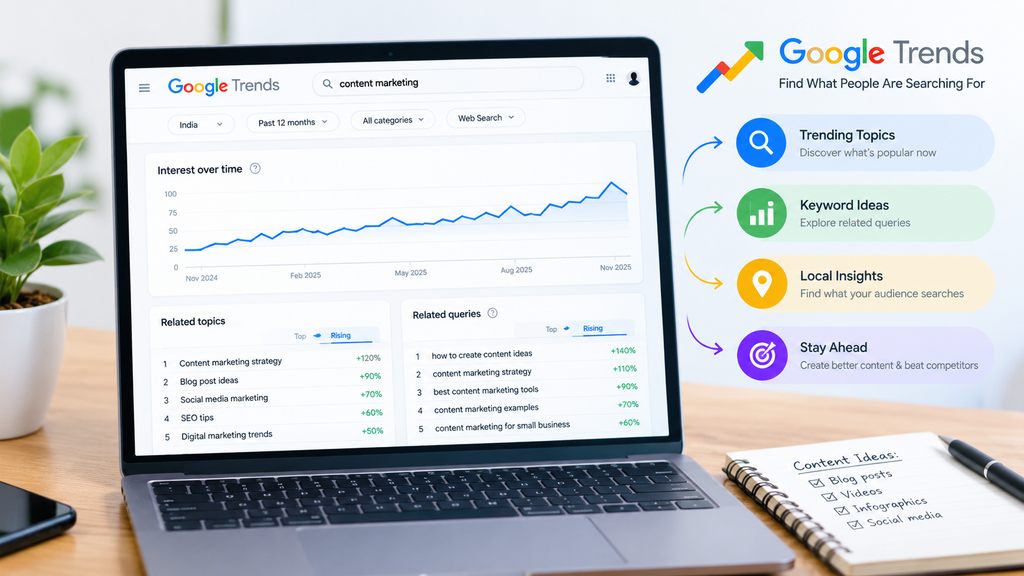
- Open up Google Trends and type in a broad topic, such as “content marketing.”
- Set the location to your country, or your state if you’re targeting a local audience.
- Change the time range. “Past 12 months” shows seasonal patterns, and “Past 5 years” shows whether the topic is growing or shrinking.
- Scroll down to Related topics and Related queries.
The related queries are where the ideas are. You’ll often find questions and phrases you’d never have thought of, and many of them make good blog titles. The “Rising” tab is especially useful, because it shows you searches that are rising quickly. A rising query which has been written about little is a real opportunity.
Spending ten minutes here gives you a month of blog topics, usually. That’s the practical answer to how to use Google Trends for content ideas: pick a broad topic and follow the related queries.
How to Find Trending Topics on Google Trends
Sometimes you don’t have a topic yet, and want to know what’s hot right now. Google Trends has a section for that, and it’s usually called “Trending now” or “Daily search trends.”
It tells you what people are searching for at this moment in your region. Here’s how to make it useful:
Check it a few times a week, not just once.
Filter by category, such as business, technology or shopping, so you only see what’s relevant.
Ask yourself whether the trend relates to your industry. If it does, write about it fast! If it doesn’t, leave it alone.
That last point is important. Chasing every trend makes a blog look scattered. The point when you find trending topics on Google Trends is to catch the ones that overlap with what you actually do, and add your own point of view.
Google Trends Keyword Research for Beginners
Keyword research sounds technical, but with Google Trends keyword research for beginners the idea is simple: compare options before you commit.
Type in up to five terms, and Google Trends puts them on one graph. Say you can’t decide between “SEO for small business” and “local SEO.” Compare them and see which line is higher and which is rising.
A few beginner habits help:
- Compare similar phrases. Small wording changes can mean very different interests.
- Look at the shape of the line. A spike that vanishes is a news event. A steady climb is a real topic.
- Check the region. What works nationally may not work in your city.
One honest limit is that Google Trends doesn’t give exact search volumes. For those numbers, pair it with a keyword tool. Trends tell you what’s rising and when, and the other tool shows you how big it is. Together they give you a solid starting point.
How to Use Google Trends for SEO
Now the part everyone wants. How to use Google Trends for SEO comes down to timing, relevance and focus.
Timing. If a topic peaks every October, publish your post in August or September so it has time to be indexed and ranked before the rush. Many businesses publish when the season arrives and miss the wave.
Relevance. Use the related queries to shape your headings. If people search for “how to use Google Trends for content ideas,” that phrase can be an H2. You’re answering the question the way people ask it.
Focus. Trends help you choose between two keywords. Pick the one that has steadier or rising interest.
It also helps with Google Discover, the personalized feed of articles that appears on many phones, without having to search. Discovering fresh, interesting, visually appealing content, and rising topics from Trends are a good source of ideas that fit. There’s no guarantee of being featured, but timely, helpful content gives you a better chance.
Google Trends for Digital Marketing
A good digital marketing strategy isn’t built on guesses, and there are a few practical ways Google Trends supports it.
For content marketing, it helps you plan a calendar around when people care. A post that lands just as interest begins to climb tends to perform better than one published after the peak.
For SEO e-commerce, it tells you which products and categories are hot, and in which regions. If you run an online store, you can use that to decide which product pages to improve first and when to run offers.
For campaigns, it tells you when to push harder with ads and when to hold the budget. And for competitor research, you can enter a rival’s brand name and see whether their interest is rising or falling.
Don’t Forget Local SEO
If you serve customers in a particular city or area, local SEO should be part of your plan, and Google Trends can help with that, too.
Set the location filter to your city or state, then compare phrases like “digital marketing agency” and “SEO services near me.” You’ll see which terms your local audience cares about. Then write for them, and keep your Google Business Profile updated with the same language. A well-kept profile, with correct business details and local content, sends Google the message that you’re a relevant answer for people nearby.
Many businesses miss this and compete nationally for terms they could win locally. Starting small and local is often the smarter route.
Who We Are: Reach Skyline
At this point you may be thinking, “This makes sense, but I don’t have the time to do it all.” That’s why agencies like us exist.
Reach Skyline started in 2017 in a college hostel with nothing but determination, and today we’re a full-service digital marketing agency with a team of 25+ professionals. Over 50 brands have trusted us with their growth. We didn’t forget that small beginning, and it influences how we work: we listen first, then build.
Here’s what you can expect from us:
- Customised strategies, not copy-paste plans. Every business has different goals, so every plan we write starts from yours.
- Data-driven work with a focus on ROI. We look at the numbers and tell you frankly what’s working and what isn’t.
We cover content, SEO, local SEO and wider digital marketing, and our agile team adapts quickly when the market shifts. If you’d like to see how we think, read more on the Reach Skyline blog.
Frequently Asked Questions
1. Is Google Trends free to use?
Yes. Google Trends is completely free to use, and you don’t need an account to use it.
2. Does Google Trends show the exact number of searches?
No. It tells you how much interest there is on a scale from 0 to 100, not the raw search numbers. You can use a keyword tool alongside it if you need estimates.
3. How often should I check Google Trends?
For content planning, a quick check once or twice a week is enough. For seasonal topics, view the past five years of data before you plan your calendar.
4. Can Google Trends help with local SEO?
Yes. You can filter by country, state and sometimes city, so you can see which phrases your local audience searches for and use them on your pages and Google Business Profile.
5. Can small businesses benefit from Google Trends, or is it only for big brands?
It’s useful at every size. Small businesses may benefit most, because it helps them choose topics and timing carefully instead of spending money on guesses.
6. Is Google Trends enough for SEO on its own?
Not by itself. It’s excellent for ideas, timing and comparison, but you’ll still want a keyword tool, good on-page SEO and quality content to rank.
Conclusion: Start Small, Stay Consistent
Google Trends won’t write your content or rank your pages by itself, but it will show you what people care about right now. Start with one topic, compare a few phrases, study the related queries and publish while the interest is rising.
If you’d like help turning those ideas into traffic and leads, we’re here. At Reach Skyline, we stand by honest reporting, clear communication and quality work that you can measure. We’ve earned the trust of more than 50 brands by doing exactly that, and would be glad to do the same for you.