
Have you ever written a great blog post and got zero people clicking through? Or engaging with it at all? It can be pretty frustrating and usually has nothing to do with the content itself.
It’s more likely that the issue was either the topic you’ve selected or the timing. However, the good news is that Google gives us the answer to this question for FREE and it’s called Google search trends.
In this guide we’ll show you how to use this tool effectively to generate a constant flow of new blog post ideas.
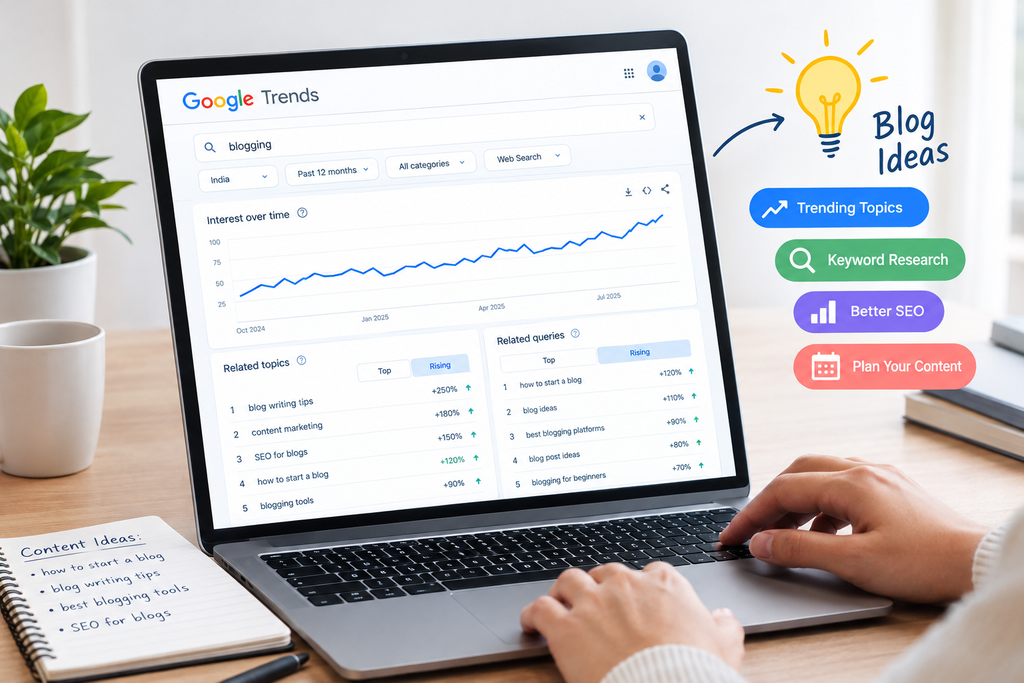
What are Google Search Trends?
Google trends is a completely FREE tool, officially named Google Trends, that will show you how popular a particular search term is. Simply enter the keyword/phrase and you’ll get a basic graph showing whether the interest is increasing, decreasing or staying the same.
One thing you may not realise is that Google Trends doesn’t actually show you the exact amount of searches, it does show you the relative interest. This will be shown on a scale of 0-100. 100 means that it’s the most popular point for that term within the time frame and location selected. Whereas 50 would mean it’s half as popular as the peak point.
This may seem a bit restricting but actually it’s very useful. We’re not looking for an exact figure, we’re looking for the trend. Is this topic increasing? Does it increase every year at the same time? Is it popular in my area? This is the key to having a smart content strategy.
Why Use Google Trends for SEO?
Whilst most people think about keywords and high volume, smart marketers know that timing is key.
By using Google Trends for SEO, you can:
- Identify trending topics early so you can publish first.
- Avoid topics that are slowly decreasing.
You can also plan content around seasonal topics, festivals and busy times. Plus it shows you what actual words people are using. Sometimes you may be using a different name for the topic but your customers may be searching for completely different terms.
How to Use Google Trends
You don’t need any special skills to use Google Trends. Simply follow these steps.
Type in your topic – Visit the Google Trends website and type in a keyword related to your business (e.g ‘interior design’ or ‘digital marketing’).
Select your location – Choose which country you’d like to search, or even a specific state or city if you’re a local business.
Select your time frame – To see what’s trending at the moment select the last 12 months. But if you want to see long term trends choose 5 years or more.
Choose your search type – You can choose to search for Google Web Search but you can also search Images, News, Shopping and YouTube.
Look at the graph – Look for upward trends, regular increases every year. Also look at the related topics and related queries section. This is where you’ll find some awesome blog post ideas.
How to Use Google Search Trends for Blog Post Ideas
Let’s get into using this. This is how to use Google search trends for blog post ideas.
Start with a general topic and then look at the related queries section. Toggle between ‘Top’ and ‘Rising’. ‘Top’ will show you what’s consistently popular. Whereas ‘Rising’ will show you what’s increasing the fastest. This is a goldmine for new content.
Let’s say you run a fitness studio. You search for home workout and notice a rising query for a specific type of exercise. This will give you a blog post idea. You can write about this early on and get ahead of the competition. You may be able to get higher in the rankings.
A good tip is to check this once a week. Note 3/4 rising topics and match them to a blog post title. Within a month you’ll have a whole content calendar.
How to See Trending Topics on Google
Sometimes you just want to know what everyone is talking about. This is where the trending searches on Google can help.
On the homepage of Google Trends there are sections to show what people are currently searching. Usually you’ll be able to filter by country. You can see what’s spiking suddenly, what’s trending due to news and what’s trending daily.
Not everything trending will be relevant to your blog. Just because a celebrity story is going viral doesn’t mean it’s relevant to your business. This will only bring people to your site but they won’t convert. Choose topics that naturally relate to what you sell and add your own useful perspective.
Google Trends vs Google Keyword Planner
This is one of the most commonly asked questions. They are 2 completely different tools.
Google Trends will show you how popular a topic is over time and location. This is great for knowing when to publish, seasonal topics and identifying rising topics.
Google Keyword Planner (found under Google Ads) will show you the estimated volume of searches and competition. This is better to use to see how big a keyword is.
The best way to use these together is to start with Google Trends to identify a topic that’s rising. Then head to Google Keyword Planner to see if enough people are searching for it to make a full blog post worthwhile. Think of Google Trends as your compass and Google Keyword Planner as your measuring tape.
How to Compare Multiple Keywords on Google Trends
This is a great feature! You can compare multiple search terms (up to 5) to see which is the most popular.
This is super helpful when doing keyword research on Google Trends. Let’s say you’re unsure whether to write about ‘SEO tips’ or ‘SEO checklist’. Type both into Google Trends and you’ll be able to see which one is getting more interest. Plus you can see whether it’s increasing or decreasing.
To get the best comparison make sure the keywords are similar and set the location and time frame the same. Once you’ve done this you can choose your winner and use this as your main topic. Use the second one as a subsection.
How to See Search Volume Trends
To see search volume trends simply change the date range.
If a keyword is increasing every year then this means it’s a seasonal topic. You can plan and publish your content a couple of weeks before the peak. This means it will be ranked when people are searching. If a keyword has been steadily decreasing over a few years, think twice about using it.
Small businesses will really benefit from this. Whether you’re a wedding photographer, school uniform shop or sweet shop you’ll be able to clearly see what’s seasonal. Knowing this means you can plan content and offers perfectly.
Using Google Search Trends for Local SEO
If you have customers in a specific city/region then this section is for you.
Google Trends allows you to search by country, state or sometimes even a smaller area. This will show you if the topic is more popular in your region. Often you’ll also see what local terms and spellings people are using.
This is gold for local SEO. You can create content that relates to what your local customers are searching for. Mention your area and schedule your posts around local festivals and seasons. Alongside a well maintained Google Business Profile you’ll give local searchers every reason to choose you.
How Reach Skyline Can Help
Finding trends is easy but turning them into content that will rank, drive traffic and generate enquiries requires experience. That’s where we come in!
Reach Skyline is a full service digital marketing agency that started in 2017 in a small college hostel. We’ve grown to a team of 25+ professionals and have helped over 50 brands with their digital growth.
We offer bespoke solutions to help meet your goals. Our flexible team can adapt quickly and our focus on ROI means everything we do is data driven and based on real customer insights. We aim to provide high quality work from keyword research, content planning, local SEO and full marketing strategies.
Our blog has plenty of useful marketing and SEO tips for business owners.
Frequently Asked Questions
Is Google Trends Free?
Yes! Google Trends is completely free and you don’t need to sign up.
Does Google Trends Show Exact Search Volumes?
No. Google Trends will only show you relative interest on a scale of 0-100. If you want to see estimated search volumes use a tool such as Google Keyword Planner.
Is Google Trends Accurate for Keyword Research?
Yes! It’s very reliable for seeing trends, seasonal topics and rising topics. For a complete picture use alongside other keyword tools.
How Often Should I Use Google Search Trends?
Most businesses will benefit from using this once a week. If you’re a seasonal business then you may want to use this more regularly before peak times.
Can Google Trends Help Small Businesses?
Yes! It helps small businesses plan content around local demand and seasonal topics. And it’s completely free!
Can I Compare Multiple Keywords on Google Trends?
Yes! You can compare up to 5 search terms and see which one is the most popular.
Conclusion
Creating great content isn’t just about writing well, it’s about writing the right thing at the right time. Using Google search trends is a simple and free way to achieve this. Identify rising topics, compare your keywords, take seasonality into consideration and focus on your local audience. If you’re consistently doing this your blog will stop becoming a guess.
We’re here to help you turn your research into results! We have a dedicated team with experience and have helped over 50 brands.
Today we want you to try this out. Open up Google Trends and type in your main topic. Look at the Rising section. Chances are you’ll have your next blog title!